Want to buy the best Lego® sets at a good price without checking shops every day? In this guide we show you step by step how to set a price alert in the free Brickfact app, how the alert reaches you and how to check whether a price is actually good.
A price alert watches one set for you. You name your target price, and Brickfact sends you a push notification as soon as the set reaches it. The price comparison and the price history on every set page help you choose a realistic target and judge the offer before you buy.
Whether you're looking for sets for yourself or as a gift, a few minutes of setup can save you a noticeable amount on your next purchase.
Lego® price tracker for set deals
Price alerts are not new. Many price comparison sites let you enter a threshold for a Lego set and send you an email once it is reached. That works well for sets you are happy to wait for. With short-lived deals, though, minutes matter: popular sets at a strong discount often sell out within a few hours, and an email you only read in the evening can come too late.
The Brickfact app sends the alert as a push notification straight to your smartphone. You see the offer, compare it with other retailers and decide right away. This matters most for popular sets with short discount windows, such as the best Lego investment sets under $100.
The Brickfact app is free, has no subscription or in-app purchases and is available for iOS and Android.

Below, we show you step by step how to use the Brickfact app as a Lego price tracker.
Using the Lego® price tracker: Instructions
First, download the Brickfact app. You can set price alerts straight away without creating an account. Signing in with Google, Apple or an email link is optional and links your alerts and collection to your Brickfact account.
1. Lego® Set search
Open the Browse tab and enter the name or the set number of the Lego® set in the search. The results show a thumbnail, the set number and the current lowest price, so you can quickly pick the right set. Tap it to open the set page.
If you are standing in a shop, the box scanner is quicker: take a photo of the box and the app reads the set number. The photo stays on your phone.

2. Create price alert
On the set page, tap the bell icon to create your Lego® set price alert.
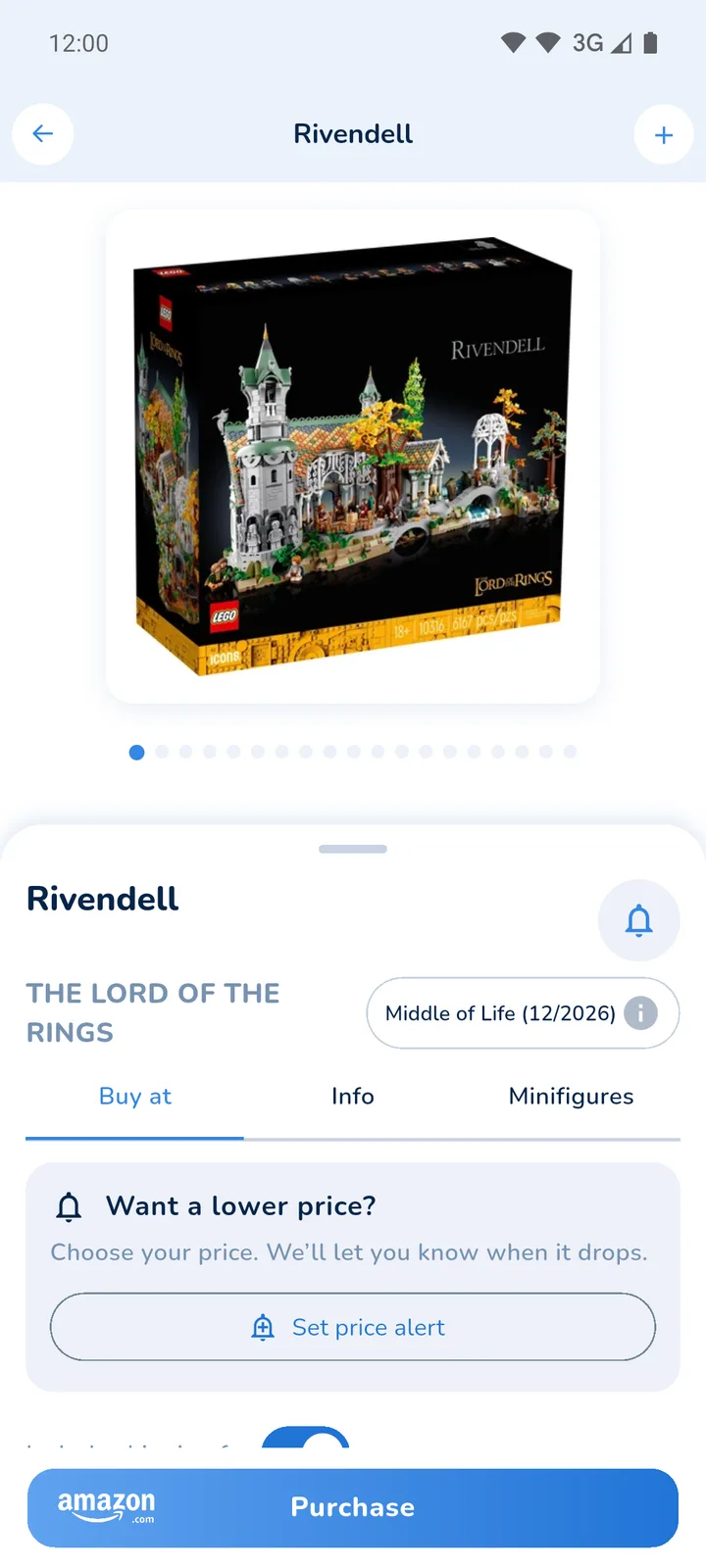
The dialog shows the current best price and preselects a target 5% below it under "Notify me at". You can pick one of the two lower suggestions or choose "Custom" to enter your own desired price, and add a note if you like. Then tap "Set price alert": as soon as the set reaches your price, you get a push notification. Your target has to be below the current lowest price, otherwise the alert would trigger immediately. If you only want to bookmark the set, choose "Save to watchlist only".

You can also create a price alert directly from a deal. This is useful when a set is already discounted but you want to wait for an even lower price.
3. Manage price alerts
All your alerts are collected in the Savings tab under Price alerts. You can filter the list by all sets, active price alerts and alerts that have been reached, and sort it. Tap a set to change the desired price or the note, or to remove the alert.

Note: Each price alert sends one notification. Once it has been triggered, the set is marked "Alert already triggered". If you change the desired price afterwards, the alert is active again.
To make sure the alert actually reaches you, allow notifications for Brickfact in your phone settings.
Lego® price comparison: find the best price
In addition to price alerts, the Brickfact app compares the prices of many retailers. This is particularly useful if you want to buy a Lego set right now at a good price without waiting for an alert.
Open the set page as described above. The Buy at tab lists every retailer that currently stocks the set, cheapest first and with shipping included. You can find the same comparison on the set pages and in the Lego database on brickfact.com, which is handy on a laptop. Which retailers we monitor and how we rank their offers is explained in how we compare prices.

View price chart of Lego® sets
A price alert is only as good as its target. The price history helps you set one that is realistic: you can see how strongly the price of a set fluctuates and whether the current offer is close to a low point. This is also particularly relevant if you are interested in investing in Lego.
In the Brickfact app, the price chart is on the respective set page under Info as "Market Price". You can choose the time period and see the highest and lowest value. Market value is the average price of sales on secondary marketplaces, so it is most useful for retired sets. For sets that are still in shops, the set pages on brickfact.com also show the retail price history and the lowest price of the last 30 days.

A practical rule: for a set that is still available, a target close to its previous low is realistic and can be reached during the next discount campaign. A target far below every price the set has ever had will rarely trigger.
Lego® Set Price Tracker: Conclusion
A Lego® price tracker saves you from comparing prices by hand every day. In the Brickfact app you set your desired price with a tap on the bell, get one push notification when it is reached and manage all alerts in the Savings tab.
Before you set the target, look at the price comparison and the price history on the set page. They show you what the set costs right now and which price is realistic. That way your alert triggers for a genuinely good offer, and you can decide quickly before it sells out.
Lego® Price Tracker: FAQ
As you have already learned in the article, Brickfact lets you create personalized price alerts and follow the price development of Lego® sets. In the following FAQ we answer the most common questions about the Lego set price tracker.
Can I create personalized price alerts for Lego® sets with the Brickfact app?
Yes. Tap the bell on any set page, pick or enter your desired price and tap "Set price alert". The app preselects a target 5% below the current best price.
Will I receive push notifications on my smartphone with the Brickfact app?
Yes. As soon as a set reaches your desired price, you get a push notification, provided that notifications for Brickfact are allowed on your phone.
What is the difference between the Brickfact app and an email price alert?
The Brickfact app notifies you by push instead of email, and on the same set page you can compare retailers and check the price history before you buy.
How can I set up price alerts in the Brickfact app?
Download the app, search for the Lego® set in the Browse tab or scan the box, tap the bell on the set page and set your desired price. An account is not required.
Can I adjust or delete existing price alerts in the Brickfact app?
Yes. All alerts are in the Savings tab under Price alerts. There you can change the desired price, edit the note or remove an alert at any time.
Is the Brickfact app also available for Android and iOS?
Yes, the Brickfact app is free for both platforms, and you can create Lego® price alerts on both.